


ampm
4.67.82K Reviews
App Specs
- Version
- 3.17.0-1239
- Updated On
- License
- Free
- Downloads
- 1,000,000+
- Developer
- ampm
- Categories
- Food & Drink
- Platform
- Android
Screenshots


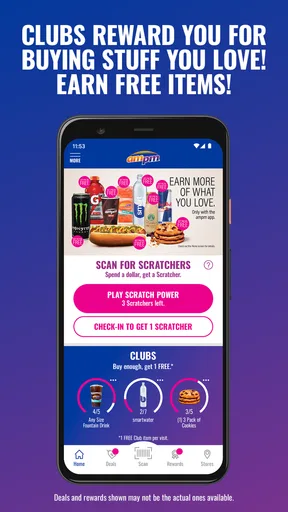
 Analysis by AppCompare
I tend to judge a convenience-store app by a simple test: does it help me make a better stop, or does it add another chore to an already quick errand? With ampm, the appeal is straightforward: it is a free Food & Drink app from ampm that brings store-related offers and savings into one place. The store’s pitch is about deals and prizes; what matters to me is whether checking the app fits naturally into a snack run rather than turning it into a project.
That distinction is useful if you are deciding whether to install it. A loyalty app is most valuable when you already visit the retailer, can understand the offer before reaching the counter, and feel comfortable with the account and data choices involved. If you only pass an ampm occasionally, the benefits may be less compelling than simply paying and getting on with your day.
What trust looks like in a convenience app
I would not treat a familiar store name as a substitute for checking the app itself. The practical question is what the app asks you to do, what information it explains, and which choices it presents before you decide to sign up or use a particular feature. That matters especially when a quick purchase involves an account, a reward, or a personalized offer.
ampm has been available since October 1, 2012, and its current release is version 3.16.0-1236. It has a 4.5 average from around 19,000 ratings, with more than a million installs. Those figures offer a sense of its reach, but they do not tell me whether a specific offer suits my shopping habits or whether I should share information to use it. I still recommend reading the in-app explanations and making each choice deliberately.
Choices worth checking before you rely on it
Before creating an account, I would look at the registration prompts and any explanation of how account details are used. If an optional choice appears, I would consider whether it is needed for the feature I want, rather than accepting every prompt automatically. The useful habit is to pause at each decision instead of treating setup as a box-ticking exercise.
I also would not assume that every offer applies to every item or every store. A discount can have conditions, and a reward can require a particular action. Checking the offer’s terms before choosing products helps avoid the familiar checkout disappointment of expecting a saving that does not apply. If the app displays a location or account choice, I would use only what is needed for the task I am doing.
When personalisation meets a quick stop
Personalized deals can be useful, but they also make it worth thinking about how much account activity you want tied to your shopping. My approach is simple: use a feature because it has a clear benefit to me, not just because a prompt encourages me to switch it on. If a tailored offer is not relevant, I can ignore it and still decide whether the app’s other functions are useful.
Worth Reading Before You Choose

EA SPORTS FC Mobile 26 Is a Bigger Football Game, but It Takes Time

Flipboard Shows What News Apps Must Do Beyond the Feed

Switching to Android Auto Means Rethinking Your Driving Routine

Google Calendar Makes a Crowded Week Easier to Manage

Ludo King Makes the Most of the Minutes Between Plans

Baby Panda World Brings Quick Play to Modern Phones, but Its Game Library Feels Busy
Location is another moment to be intentional. A store finder is more convenient when it can use your position, while searching by area may be preferable if you do not want to share location for that task. I would choose the least intrusive option that still gets me where I need to go, and check the device’s app permissions if I want to change that choice later.
A measured recommendation
For me, trust here is less about making broad promises and more about being able to see the choices in front of me. The app is rated Everyone 10+, and it is designed around everyday convenience-store shopping. I would still review the prompts and terms myself, especially before linking an account to regular purchases or relying on a promotion with conditions.
It is a sensible option for people who already stop at ampm and want to check the available savings before buying. If you value a minimal digital footprint, dislike sign-ups, or rarely shop at the chain, the ordinary in-store route may be a better fit. The app is worth trying when its offers make a real difference to your routine, not simply because installing another loyalty app sounds appealing.
Ever found yourself in a situation where you’re just craving a quick snack or a caffeine fix, but you’re not exactly sure where to go? That’s where the ampm app comes in, promising to be a game-changer for those who love convenience and, let's be honest, snacks on the go. After spending some quality time exploring the app, here’s my take on all the goodies it offers.
What’s the Buzz About?
At its core, the ampm app is designed to make your pit stops at your favorite convenience store even more convenient. Whether you’re a regular at ampm or just someone who occasionally pops in for a quick bite, the app is packed with features that might just make it your new best friend.
Exploring the Features
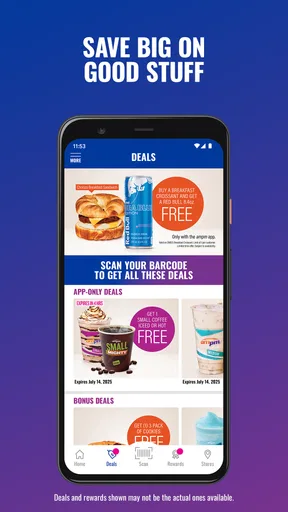
First off, let’s talk about the user interface. It’s sleek, straightforward, and incredibly easy to navigate. I didn’t find myself overwhelmed with too many options, which is a win in my book. The home screen greets you with some enticing deals, and who doesn’t love a good bargain?
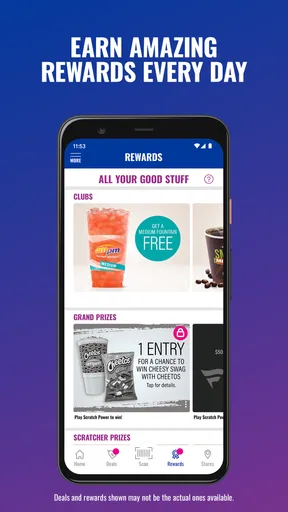
One of the standout features is the rewards system. Every purchase gets you points, and these points can be redeemed for discounts or even freebies. It’s like they’re paying you to snack! I found this particularly motivating and a great way to keep users coming back.
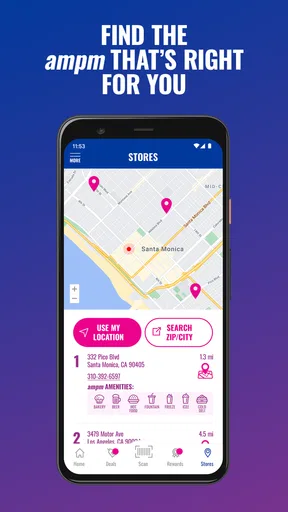
The app also has a store locator feature. It’s super handy if you’re in an unfamiliar area and need to find the nearest ampm store. This feature is not just about finding the closest store; it also provides you with directions, store hours, and even a peek at what’s in stock. Talk about convenience!
Making offers useful rather than distracting
For a regular customer, the most useful routine is to check the app before deciding what to buy, not while standing at the register. I would scan the offers at home or on the way, choose one or two that match something I already planned to pick up, and then confirm the conditions in the app. That order keeps a bargain from becoming an excuse to spend more than intended.
This is also where a retailer app differs from a general coupons or deal-finding app. A broad coupon app may cover many shops, while ampm is relevant specifically to visits at ampm. That narrower focus can be an advantage if the store is already part of your route: fewer unrelated deals to sort through, and a reason to check what applies to this particular stop. It is a disadvantage if you compare prices across several retailers or want one place for offers from many chains.
A realistic use case is a commute home when I need a drink and a small snack. I can check whether an offer fits that planned purchase, see whether a nearby store is convenient, and decide before I arrive. If there is no relevant deal, I can ignore the app and buy what I came for. The best saving is often the one that helps with an existing need, rather than one that nudges me into an unplanned extra.
What the rewards routine asks of you
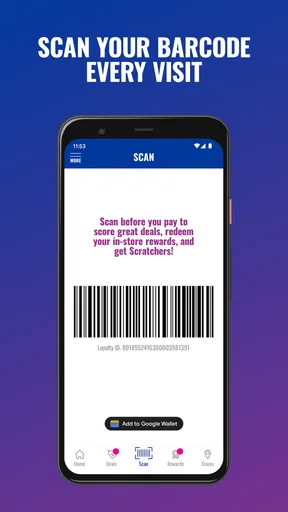
Rewards make more sense when you can understand the earning and redemption steps without slowing down a quick visit. I would check how a qualifying purchase is recorded, whether an action is needed at checkout, and what the app says about redeeming a reward before counting on it. This is a practical point, not fine print to leave until later: if the process requires a screen or scan at the counter, it helps to have the app open before joining the line.
I would also treat points as a bonus, not as cash already saved. Their value depends on the redemption choices and any applicable terms. If reaching a reward would require buying things I would not otherwise choose, the deal may not be a good deal for me. The app works best when the reward follows my normal shopping rather than changing it.
For people who visit infrequently, the key question is whether the offers are useful often enough to justify keeping an account and checking another app. A regular customer can build the habit around an existing stop; an occasional visitor may find that remembering the app, signing in, and checking terms outweighs a modest benefit. There is no need to force a loyalty routine if a simple purchase is easier.
Finding a store without turning on every setting
The locator is most valuable when I am away from my usual area or need to compare a few possible stops along a route. I would use it before driving, when I have time to assess directions and hours, rather than trying to search while moving. Store details can help with planning, but a listing should not replace checking that the location suits the immediate errand.
For a one-off search, I would consider whether entering a place or area is enough, if that option is available, before granting device-level location access. For repeated nearby searches, location access may be more convenient, but I would make that choice based on how often I use the feature. This is a small trade-off: less setup can mean more convenience, while a manual search can give me more control over when my location is used.
I would not plan a trip around an item appearing in an app unless the app makes its availability clear for that specific store and moment. Inventory can change, and the more important the item is, the more sensible it is to verify before making a special detour. The locator is useful for finding a place and planning a stop; it is not a reason to assume every desired product will be waiting.
Who gets the most from it
I would recommend trying it if ampm is already a regular stop, you enjoy checking retailer offers, and you are comfortable managing a shopping account on your phone. It is also more useful to someone who can glance at promotions before leaving, rather than someone who dislikes using a screen during checkout. In that situation, a little preparation can make the app feel like a practical companion instead of one more interruption.
I would skip it if ampm is rarely on your route, you prefer not to sign up for retailer accounts, or you mainly want a broad comparison of prices and discounts across different stores. A general deals service or the retailer’s ordinary in-store shopping may better match those needs. The app’s value is tied to the chain, so its convenience falls quickly when the store itself is not convenient for you.
It is also worth considering your phone and operating system before installing: the app supports Android 6.0 and later. That makes it accessible to many older Android devices, although I would still keep the app updated where possible and check that it runs properly on my particular phone. The app is free, so the real cost is less about a purchase price and more about the time and account choices involved.
Using it in a way that stays manageable
My low-friction approach would be to install it, look through the account choices, and then test the app on a normal visit rather than changing my shopping routine around it. I would save a preferred store only if that makes repeat searches easier, review an offer’s conditions before relying on it, and check whether the reward process is clear before reaching the counter. These small habits answer the practical questions most new users have: do I need an account for what I want, how do I avoid missing a condition, and will the app save time on an ordinary stop?
If an offer is unclear, I would not guess at the terms or assume a cashier can apply it automatically. I would use only promotions whose requirements I understand, and leave the rest alone. That keeps the app helpful even if I do not want to engage with every reward or personalization prompt it presents.
The app has been on the market since October 1, 2012, and its current version is 3.16.0-1236. With a 4.5 average across around 19,000 ratings and more than a million installs, it has clearly found an audience among convenience-store shoppers. I see those numbers as context rather than a guarantee: whether it earns a place on your phone depends on how often you visit and whether its specific offers fit your needs.
Getting started with the app is a breeze. Download it from the Play Store or App Store, sign up with a few quick taps, and you’re in. The registration process is painless, and I didn’t encounter any hiccups. Once you’re all set up, the app remembers your preferences, making future visits even smoother.
Another feature I appreciated was the ability to customize my experience. You can set your favorite store, track your purchases, and even get personalized deals. It’s like having a little personal shopper in your pocket.
Real-World Usage
So, here’s the real question – does it make a difference in an actual store visit? I’d say yes. Walking into an ampm store with the app on my phone felt like having a VIP pass. I could easily check out the latest deals, scan my purchases to earn rewards, and even get a sneak peek at upcoming promotions.
One thing I noticed was how seamless the integration between the app and the in-store experience was. It’s clear that a lot of thought has gone into making sure the app complements the physical shopping experience rather than complicating it.
Final Thoughts
All in all, the ampm app is a solid addition to the digital landscape of convenience shopping. It’s practical, easy to use, and genuinely enhances the shopping experience at ampm stores. Whether you’re a snack enthusiast or just someone who appreciates a good deal, this app is worth checking out.
So, next time you’re craving a late-night snack or just want to make the most out of your stop at an ampm store, give this app a whirl. You might find yourself wondering how you ever managed without it!
Pros
- User-friendly interface for easy navigation.
- Real-time inventory updates enhance shopping.
- Convenient mobile payment options available.
- Customizable notifications for deals and offers.
- Quick and easy account setup process.
Cons
- Limited delivery areas may affect availability.
- Occasional app crashes disrupt user experience.
- Requires constant updates for smooth performance.
- Limited customer support options available.
- Some features lack detailed instructions.
FAQs for ampm
What is the main functionality of the ampm app?
The ampm app is designed to enhance your convenience store experience by offering features such as mobile ordering, exclusive deals, and rewards. Users can browse products, place orders for pickup, and earn points on purchases. It aims to streamline your visit to ampm stores, making it faster and more rewarding.
Is the ampm app available for both Android and iOS devices?
Yes, the ampm app is available for download on both Android and iOS platforms. You can find it on the Google Play Store for Android devices and the Apple App Store for iOS devices. Ensure your device meets the minimum operating system requirements for optimal performance.
Are there any special offers or rewards for using the ampm app?
Absolutely! The ampm app offers exclusive deals and promotions that are only available to app users. Additionally, you can earn rewards points with every purchase, which can be redeemed for discounts or free items at participating stores. It's a great way to save money on your favorite snacks and beverages.
Can I use the ampm app to find store locations and operating hours?
Yes, the app includes a store locator feature that helps you find the nearest ampm store. It provides detailed information about each location, including operating hours and contact details. This can be especially useful if you’re traveling or need to find a store outside your usual area.
How secure is my personal information on the ampm app?
The ampm app prioritizes the security of your personal information. It uses encryption and other security measures to protect your data. Additionally, the app requires user authentication to access your account, ensuring that only you have access to your information and transaction history.


